
Smart TVs are great at one thing: showing you ads before you’ve even picked something to watch. The home screen lags, the “recommended” row is someone else’s idea of what you want, and the software stops getting updates long before the panel wears out. A streaming box like the NVIDIA SHIELD helps, but that’s another device to buy, and another interface someone else controls (plus bluetooth SUCKS on my own SHIELD).
Meanwhile, plenty of us have an old laptop or a small PC sitting in a drawer. It can already play just about anything: Kodi, Plex, YouTube, Steam, retro games. What it can’t do is feel like a TV. Plug it into the living room and you’re squinting at a desktop and hunting for a mouse from the couch.
Enter HDLounge. It’s a free, open-source launcher that turns a GNOME Linux PC into a TV-style home screen you drive entirely with a remote or a game controller.
Why I built it
I’ve wanted to build something like this for years. What finally got me going was the new Plasma Bigscreen, KDE’s TV interface for Linux. I had a lot of fun playing with it, but I live on GNOME, and I wanted that same couch-friendly experience there. So I figured now was as good a time as any to get crackin’.
HDLounge isn’t meant to be your desktop. You can still use the machine as a normal computer when you need to, but HDLounge is designed to live on the TV, with a Bluetooth remote or a gamepad in your hand.
What it can do
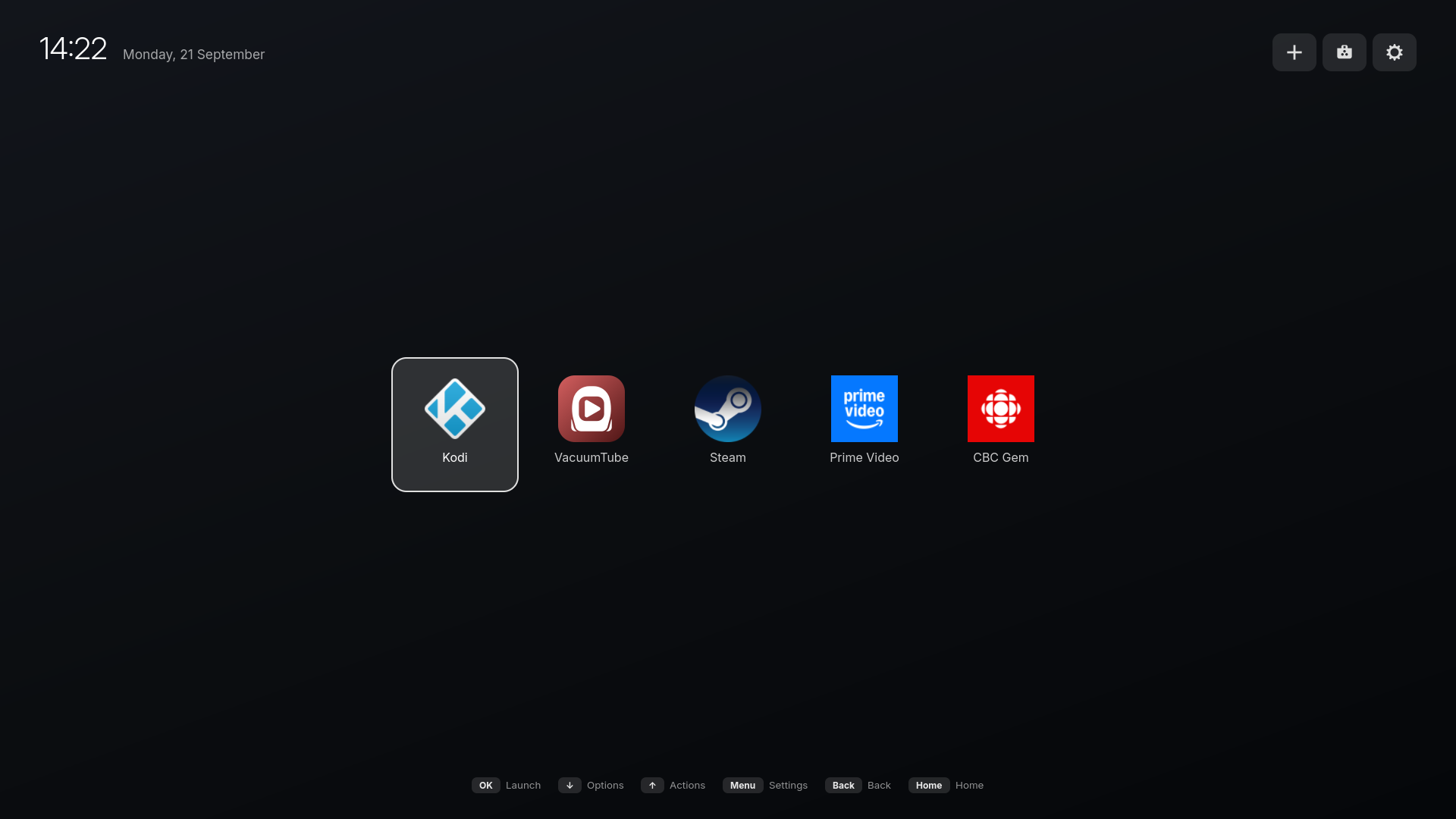
Turn it on and you land on a fullscreen home screen with customizable background image, a clock and a single row of your apps. Apps opens fullscreen. Press Home on the remote and you’re back.
- One simple app drawer. Pin the apps you use, reorder them and see at a glance which ones are running.
- Everything opens fullscreen. Kodi, Plex, VacuumTube (a YouTube TV app), Steam, RetroDECK. No windows to wrestle with.
- Per-app options. Press Down (or hold OK) on a tile to close an app, force-quit one that’s frozen, toggle fullscreen, reorder or unpin it.
- Nothing gets lost. If something opens that isn’t pinned, like Settings or a game Steam started, it gets its own tile so you can always get back to it.
- Streaming websites as apps. Netflix, Prime Video, Disney+, Crave, CBC Gem or any web address becomes a tile of its own, but is just a Chrome window.
- Remote or controller. A Bluetooth TV remote works, and so do most game controllers (Xbox, PlayStation, Switch Pro, 8BitDo and more).
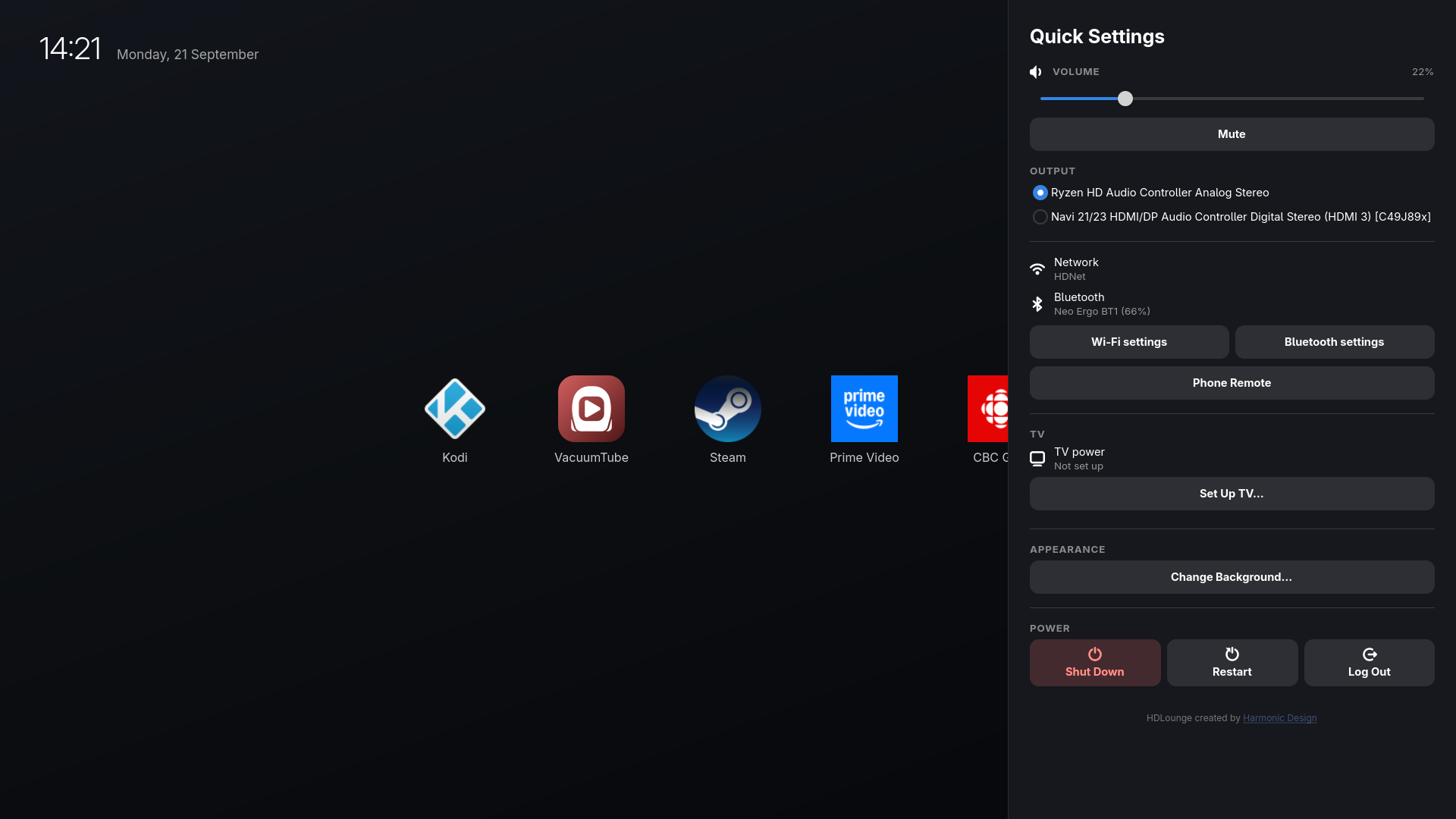
- Quick settings. Press Menu for volume, which speakers or soundbar to use, network and Bluetooth status (including your remote’s battery level), phone-as-remote pairing and TV power.
- No stray cursor. The mouse pointer hides itself after 10 seconds, so it’s not in the way.
The problems I had to solve
Building a home screen was the easy part. Making a PC behave like a TV appliance turned up problems I didn’t see coming.
Apps aren’t allowed to manage other apps
Modern Linux desktops run on Wayland, which is great for security: an ordinary app can’t see, move or control another app’s windows. Unfortunately, that’s exactly what a launcher needs to do. It has to bring apps to the front, make them fullscreen, tuck them away when you press Home and close them when you’re done.
So HDLounge comes in two halves. The part you see is a GTK4 app written in Python. The part that manages windows is a GNOME Shell extension, which runs inside the desktop itself and has the permissions an app doesn’t. The two talk to each other over D-Bus, Linux’s built-in messaging system.
Why Python? The best tool is the one you know how to use (I should really learn Rust).
The OK button isn’t Enter
This one surprised me. Android TV-style remotes, like the NVIDIA SHIELD remote and its many clones, don’t send Enter when you press OK. They send a “Select” key that most apps have never heard of. GTK ignores it, and Chrome-based apps (like that YouTube TV app) read the physical key code, so remapping the keyboard layout does nothing for them.
The fix has to go lower: a small udev rule that tells the Linux kernel to report OK as Enter before any app sees it. The installer offers to set this up for you.
The Power button had the opposite problem. Out of the box it suspends the computer, and it sits right next to the D-pad. So, a 100% hypothetical situation that has never happened to me, a dog jumps on the couch and presses the power button, and your computer turns off. This is why I made it so that it turns the TV on and off instead (for compatible TVs), and never touches the PC power or suspend state.
PCs can’t turn your TV off or on
Streaming boxes use HDMI-CEC to switch your TV on and off along with them. But almost no PC has CEC. No AMD, Intel, or NVIDIA cards have the CEC hardware. That leaves you juggling two remotes, or with a TV that sits there glowing black after the screen goes to sleep.
If you have a modern LG TV running webOS, HDLounge can actually control the TV power over your home network. When the screen blanks, the TV turns off. Press a button and the TV comes back on. I plan to add support for other makes though since I know that Samsung’s have a similar feature.
Netflix doesn’t make a Linux app
Most streaming services don’t have Linux apps, but they do have websites. HDLounge turns them into tiles that open in a fullscreen Google Chrome app window. It’s Chrome rather than Chromium because Chrome includes the Widevine DRM these services require. Behind the scenes, the extension tracks each site as its own app, so a Netflix tile shows as running and doesn’t open a second window every time you press it.
Sharing a controller with your games
A gamepad that controls the home screen launcher can’t be allowed to hijack your games. Inside a running app, HDLounge ignores the controller except for one thing: holding the Guide button takes you home. A quick tap is left alone, because Steam uses that to open its overlay.
It has to act like an appliance
A TV box can’t greet you with a password prompt after a power outage. The installer can turn on automatic login and stop the machine from sleeping or locking, while still blanking the screen after a while so a static home screen can’t burn into an OLED. HDLounge runs as a background service that restarts itself if it ever crashes, and it ignores Alt+F4.
What makes it great
- It runs on hardware you already own. That old laptop becomes a smart TV, or a home server that happens to be a smart TV too.
- No ads, no accounts, no telemetry. The home screen shows your apps and nothing else.
- It’s a real computer. Anything that runs on Linux, from Kodi to Steam to retro emulators, is one tile away.
- Setup asks before it changes anything. One install script walks you through pairing a remote, TV power, automatic login, remote access over SSH and apps like Kodi and Steam. It keeps a record of the system changes it made, and the uninstaller is designed to undo them. Emphasis on “designed to”, because it’s early days.
- It’s free software. HDLounge is released under the GPLv3 and backed by automated tests, including ones that drive the real launcher inside a sandboxed GNOME session.
Limitations
- It needs GNOME Shell 50 or 51 on Wayland. I developed it on Fedora 44 with GNOME 50.4.
- TV power only works with LG webOS TVs for now. Samsung and other brands have similar features, and I’d love contributions.
- Some GNOME apps, like the Files app, have close buttons you can’t reach with a remote. You can always press Home and close them from their tile.
- Some streaming services cap Linux browsers at a lower resolution than their TV apps.
- I’ve been using it daily for almost a month, but everyone’s setup is different, so you’ll probably run into rough edges.
Try it
HDLounge is on GitHub. If you’ve got a GNOME machine and a TV, grab the code, run the installer and reboot when it’s done:
git clone https://github.com/harm0nic/HDLounge.git
cd HDLounge
./install.sh
If you hit a problem, open an issue. And if you’ve got a Samsung TV and some patience, pull requests are very welcome.